Back in 20231, I wrote about using ltex-ls as a spell-checker in Helix. It was workable and powerful, but I found it slow and hard to configure.
A few months I was able to upgrade this to something leaner and faster: Codebook. It’s based on Spellbook, which (mildly ironically) was written during a push a year or so back for inbuilt spelling support in Helix that never quite came to pass.
I highly recommend it. Codebook is a code spell-checker, so it recognises coding
idioms like snake_case_names and camelCaseNames, and uses tree-sitter so
it’s sensitive to what the purpose of each token is — so it doesn’t flag
keywords as bad spellings, for example. Codebook works great for markdown, too.
Once this is all set up, you’ll be able to hit space + a for completions:
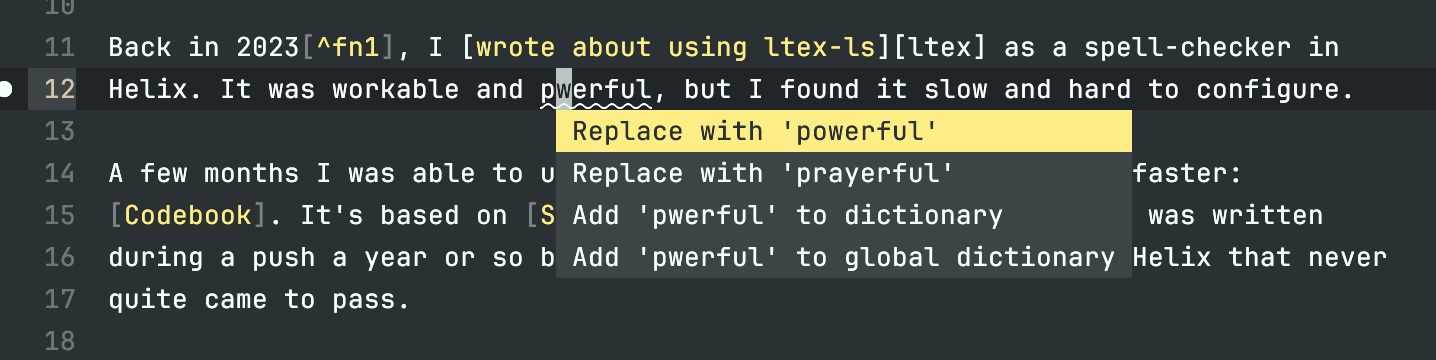
After the fold is my configuration for a few (programming) languages in British English.
Installing
To install Codebook, use cargo:
cargo install codebook-lsp
Running the same command will also update Codebook to the latest version.
What’s installed?
You can run cargo install --list to see what you have installed, in case you
forget whether you installed codebook with cargo, brew or something else.
Configuring
Codebook relies on two configuration files:
~/.config/codebook/codebook.toml— stores global configuration.codebook.tomlin your project root — stores project local configuration. For me that’s usually things like Go packages names.
Adding dictionaries is easy, unlike my experience with ltex-ls. Just add the
following to ~/.config/codebook/codebook.toml:
dictionaries = ["en_us", "en_gb"]
Both global and project-specific codebook.toml files also contain the list of
words that you’ve added to Codebook. Handily, they are kept in alphabetical
order, which helps avoid conflicts if you keep them in git. As I keep most of
my ~/.config files in git, this is a real help.
Tip: I found it best to edit config without the LSP running (quit all other editors!) — otherwise I found Codebook would overwrite my changes with the older configuration when I saved new words to the global dictionary.
To configure Helix, in ~/.config/helix/languages.toml, I make use of Helix’s
support for multiple language servers per language to add codebook:
# Add the Codebook language server
[language-server.codebook]
command = "codebook-lsp"
args = ["serve"]
# checking while typing can be distracting; option requires v0.3.20
config = { checkWhileTyping = false }

# Examples of enabling it for different languages:
[[language]]
name = "python"
language-servers = [ "pyright", "ruff", "codebook" ]

[[language]]
name="rust"
language-servers = [ "rust-analyzer", "codebook" ]

[[language]]
name = "go"
language-servers = [ "gopls", "codebook" ]

[[language]]
name = "markdown"
language-servers = [ "codebook" ]
Alongside this, I suggest setting Helix’s inline diagnostics to show only
warnings or above. Otherwise Codebook spelling issues render at the end of every
affected line, which can be overwhelming. Set this in
~/.config/helix/config.toml:
[editor]
end-of-line-diagnostics = "warning"
Reload Helix configuration (:config-reload) and spelling errors should appear.
Hit space + a to pull up the autofix menu and see the corrections.
And that’s it. Happy coding!
Gosh, two years ago! I’m somewhat surprised I’m still using Helix. Not because it’s not a good editor — it surely is — but because I’m quite flighty with editors. ↩︎